ADSB Failures

bflynn

Touchdown! Greaser!
Joined
Apr 24, 2012
Messages
10,213
Location
KGIF
Display Name
Brian Flynn
My old uAvionics transponder was proving to be unreliable...I got a naughty-gram from the FAA over non-compliance and decided to replace it with a panel mounted garmin unit. Since it was my first significant flight yesterday, I ran an ADSB compliance on the flight. As a precaution, I stayed outside airspace where adsb is required.

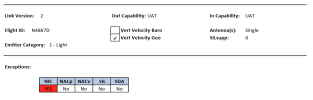
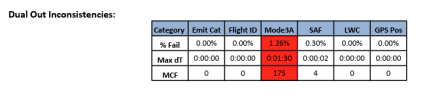
Can someone help me understand the red blocks? Are these things to be concerned about?

could be due to low level flight (1000', less than 1/2 mile off shore) along the coast south of Tampa, down to Punta Gorda, where BTW, I spotted sharks swimming just off shore.
1773089644142.png

NIC- ?

1773089763971.png
 
Mode3A is your regular Mode A transponder reply. Apparently the ground station could not detect it for longer than it can tolerate.
Can be a case of poor secondary radar coverage at your altitude.

NIC stands for Navigation Integrity Category. Basically GPS accuracy.

Also noticed your report says UAT for OUT and IN. UAT is what the uAvionix tailbeacon does, I don't know of any Garmin panel mount that does that for OUT. That should be set to Mode-S.
 
Last edited:
Troubleshooting tip: the PAPR is only a summary. For troubleshooting, you may want the entire log of all the ADSB data packets your device sent. You can email the FAA at [email protected] with your tail #, date and time to request it. They'll send you a KMZ file that you can load into Google Earth and other tools

When I was troubleshooting mine a few years ago, this was immensely useful. For example, the track made it clear that my data went red (bad) whenever I transmitted on the com radio (among other things).
 
Dumb question - you did remove the old uAvionix tail beacon, right?
I didn't, but Will did say he disabled it. It doesn't have a mode c transponder anymore to attach to, so it can't broadcast anythign.
 
I didn't, but Will did say he disabled it. It doesn't have a mode c transponder anymore to attach to, so it can't broadcast anythign.

Are you sure it can't broadcast a signal without good data? Juuuust for grins, you might try a flight with your tail beacon power switched off and make sure.
 
Background: Every time your xponder is pinged by a radar, it transmits your squawk code. And when transmitting, it draws more power, which creates voltage ripples on the DC power line since no alternator & voltage regulator is perfect. Tailbeacon detects the squawk code by sensing those ripples on its DC power input. Thus if your xponder isn't being pinged, Tailbeacon doesn't know your squawk code.

Relevant point: Originally, Tailbeacon would stop transmitting if it hadn't sensed a xponder ping for "a while" (I forgot the exact time interval). Later uAvionix changed the Tailbeacon software so that it continues transmitting the most recent xponder code that it detected, even if it hasn't detect one in a while. They made that change a few years ago.
 
My guess is that you installed a Mode S transponder that has ADS-B Out capability. You or your installer kept the uAvionix device installed and you left the Nav lights on, so it was powered. I see both when I do a PAPR. The issue is with the uAvionix unit. Remove the uAvionix and the issue should go away. Replace it with the appropriate nav or tail beacon.
 
We have the uAvionix TailBeacon. We got that nasty gram from the FAA last summer. Do not be afraid to contact them and let them know you are working the issue. They hat e to be ignored, but if you keep them advised of the findings. They are good.

I initially thought the problem as ADS-B Fringe Area Coverage. This is a glider tow aircraft, never more than 3K AGL and always in a turn. We are about 40nm from KBOS, but the ADSB ground receivers are far away. One down towards the Cape, and one in Western Massachusetts.

We worked different issues with uAvionix all summer and into the fall. Chasing wiring connections, different power interference issues. Everything checked good on the ground but not airborne. We shut down for the winter with an engine overhaul. uAvionix had agreed earlier to swap out the old with new for a considerable discount from a new purchase. I'll install that next week and we will be testing with FAA PAPR reports for compliance with FAA

I will also contact the FAA Rep I had been working with once I have two successful PAPR reports to send in. The FAA will also pull all the flights this spring to check their records and hopefully clear the issue.
 
Troubleshooting tip: the PAPR is only a summary. For troubleshooting, you may want the entire log of all the ADSB data packets your device sent. You can email the FAA at [email protected] with your tail #, date and time to request it. They'll send you a KMZ file that you can load into Google Earth and other tools

When I was troubleshooting mine a few years ago, this was immensely useful. For example, the track made it clear that my data went red (bad) whenever I transmitted on the com radio (among other things).
uAvionix did that for me and sent be the graphics.
 
I ran a PAPR on the OP aircraft and it shows you have both a 1090ES and a UAT system operating simultaneously. The uAvionix system is the one causing the issue, remove it.
 
We have the uAvionix TailBeacon. We got that nasty gram from the FAA last summer. Do not be afraid to contact them and let them know you are working the issue. They hat e to be ignored, but if you keep them advised of the findings. They are good.
Agreed. When I got the FAA warning a few years ago, at first it was intimidating. Then I realized that their involvement may be helpful. The FAA wants the same good faith compliance not only from operators, but also from manufacturers. In my case the FAA rep didn't take sides, nor did I expect him to. But he did ask us to keep him informed through the process, which I believe was a positive influence in keeping both sides fully engaged to troubleshoot and fix things.
 
Back
Top