Vevor endoscope image handling

Let'sgoflying!

Touchdown! Greaser!
Joined
Feb 23, 2005
Messages
21,872
Location
west Texas
Display Name
Dave Taylor
Home Airfield
KMRF
Anyone know:

What format the images are stored as?
(ie is it a proprietary format that makes downloading to a PC pointless?)

Will an ordinary micro SD card reader do the trick?

Nothing in the manual. Online searching likewise fruitless.
Thanks


Anyone know:

What format the images are stored as?
(ie is it a proprietary format that makes downloading to a PC pointless?)

Will an ordinary micro SD card reader do the trick?

Nothing in the manual. Online searching likewise fruitless.
Thanks


CORRECTION: @Let'sgoflying! I posted Vevor comments which are actually false by mistake. I have a Teslong purchased through Amazon and NOT a Vevor. They look similar. Vevor is a company which is defending multiple product liability and patient lawsuits.
 
Last edited:
Anyone know:

What format the images are stored as?
(ie is it a proprietary format that makes downloading to a PC pointless?)

Will an ordinary micro SD card reader do the trick?

Nothing in the manual. Online searching likewise fruitless.
Thanks


I've got one of these and am considering upgrading to the solid shaft borescope that Mike Busch recommends. While this style works, it is a bit of a pain to control the flexible section and get good pictures. I've borrowed the other version and it seems a bit easier to use one handed.
 
I have the Ablescope and am very happy with it.
 
You've got to be kididng me. I'd not buy a Vevor anything. Absolutely the worst of imported junk with no customer support. They're answer to anything is to just try to get Amazon to give your money back. I bought a Vevor ladder because I needed something light to get me on to the roof of a rental property I was installing a dish on. The second time I went up it one of the extrusions that form the rungs outride failed and dumped me six feet to the floor. I still think I may have broken my wrist through that debacle.
 
I recently bought a borescope from Matco, It works via BT/wifi with just about any phone, tablet, laptop, or even a desktop.
It has resolution to look good and sharp on a ~60" flat screen.
 
You've got to be kididng me. I'd not buy a Vevor anything. Absolutely the worst of imported junk with no customer support. They're answer to anything is to just try to get Amazon to give your money back. I bought a Vevor ladder because I needed something light to get me on to the roof of a rental property I was installing a dish on. The second time I went up it one of the extrusions that form the rungs outride failed and dumped me six feet to the floor. I still think I may have broken my wrist through that debacle.
Vevor is a completely crap shoot, that's true. I kind of view it like Harbor Freight, except with much less quality control and generally no ability to return it. I'm actually not even sure if it's a brand, or just a sticker that is put on some products. Agree that I'd never use it for anything safety related. But all that said, I do have the flex borescope thing, and it works OK. I didn't buy it to inspect engines, but to do household things like locate wires in walls or inspect plumbing things more easily. Those things it can do just fine, and easier than tearing walls apart which was the old way. So it works for me where the alternative would be to spend 4x as much for something that's more reliable and works better.
 
We recently got the Vividia Ablescope 400i. Quite happy with it.
I have the same scope. It has worked in the past but just tried and the program keeps shutting down as I try and take photos. I uninstalled the program and redownloaded it and installed but no luck. I am using a windows computer. I tried installing the IOS software on my ipad and I cant even find the camera to try it. Any ideas?
 
I have the same scope. It has worked in the past but just tried and the program keeps shutting down as I try and take photos. I uninstalled the program and redownloaded it and installed but no luck. I am using a windows computer. I tried installing the IOS software on my ipad and I cant even find the camera to try it. Any ideas?

If you’re using a PC, you should be able to just plug it in and it will recognize it as a camera. No software needed. If you can’t see through it you might have to “flip” the camera (like Zoom or Teams might use the forward facing camera above your laptop screen, find the flip button).
 
I have the same scope. It has worked in the past but just tried and the program keeps shutting down as I try and take photos. I uninstalled the program and redownloaded it and installed but no luck. I am using a windows computer. I tried installing the IOS software on my ipad and I cant even find the camera to try it. Any ideas?
I had a similar problem and it seemed to happen when I moved the scope and grounded it against the spark plug hole. I tried connecting a wire to the shaft of the scope and grounding it (with an attached alligator clip) and that fixed my issue.

Not sure about finding the device, though, but I’m using my PC laptop
 
Anyone know:

What format the images are stored as?
(ie is it a proprietary format that makes downloading to a PC pointless?)

Will an ordinary micro SD card reader do the trick?

Nothing in the manual. Online searching likewise fruitless.
Thanks


Looks identical to the Teslong - assume there's one factory that cranks these out under different names - the CMOS cameras are commodities now anyhow. Have several Teslong and they all save .jpeg. The saved files never look as crisp as when they were on the screen FWIW. But they do the job. You can pop out the card or the whole thing will mount as a drive on your PC when attached via a USB-C cable. Hard to complain at 100-140$ depending on the day at Amazon. Do want to upgrade to a joystick borescope though...
 
I had a similar problem and it seemed to happen when I moved the scope and grounded it against the spark plug hole. I tried connecting a wire to the shaft of the scope and grounding it (with an attached alligator clip) and that fixed my issue.

Not sure about finding the device, though, but I’m using my PC laptop
I will give this a try. Thanks
 
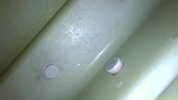
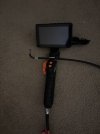
I can speak for the Vevor Articulated model. It saves in JPG and has a great picture. Of course I do not know about any other model. Picture attached is the actual jpg from the unit and a picture of the Vevor model

Rob
 

Attachments

  • IMG_3334.jpeg
    IMG_3334.jpeg
    69.3 KB · Views: 11
  • image.jpg
    image.jpg
    1.8 MB · Views: 10
Back
Top