US Light-GA Pilots Wanted for SkyDemon Beta Testing

RobHart

Filing Flight Plan
Joined
Jan 20, 2026
Messages
16
Display Name
Rob From SkyDemon
SkyDemon is a flight planning and navigation app which has been going for over 15 years. Our main focus has been on European VFR, where we have been pretty successful at depicting complex fragmented data in a clear and friendly way. For a long time we have had access to FAA data for the US, but have not done any particular work to develop it to the same degree as we have for Europe.

However, with the help of some guys from this forum we have done a big round of development on our US chart; we are now looking for some more testers to give a bit more feedback on our efforts in preparation for the next round. Right now the only beta version available containing the US charting work is on iOS, and if you would like to get involved here are some notes:
  • Download the Apple Beta testing “Testflight” app from the Appstore, and once installed visit SkyDemon Beta Software on that device, clicking the “Invite me to SkyDemon Beta” link. This should then download the latest iOS SkyDemon beta version of the app.
  • You will need a login to access the app, and a no obligation free trial login can be created here: Start Using SkyDemon ; just enter your email, and then on the next page your name and country to be sent a password which will work in the app for 30 days.
Once you are in the app you will find access to our documentation and some tutorial videos in the Help menu that will help you get started. Of course you can feel free to ask me any questions either in this thread or in PM.

Overall we are hoping to get a general impression of how our charts look and feel to US pilots; there are some cultural differences between European and US aviation, so all feedback about the work we have already done is welcome and appreciated - but particularly it would be great to understand any perceived “feature gaps” which we can then focus on for the next wave of development.
 
Sounds exciting.
When you have it ready for launch, please have a live webinar explaining how it works.
Good luck
 
Our main focus right now is on getting the feeling right; these last few weeks we have made some depiction changes and integrated some new data (Currently in progress is depiction of SFRAs, and geo-referencing airfield diagrams), but we really need to get some more opinions on what else we should be prioritizing - ie what data is considered essential for US light GA. If you were curious, you could download the latest public release from the app store, and then subsequently try the beta to see the scope of improvements so far

Additionally, I would really like to get some US pilots views on our base charts as a whole - we have basically doubled down on the concept of vector mapping, and the aim is to get our charts and data to a similar level of content as the paper chart, but to feel smoother and clearer with all the benefits that digital depiction allows for. We have our own standard "SkyDemon" chart style which we are quite proud of, but we are also considering whether we should make a special chart style for the US which mirrors the sectionals more closely. it would be really great to get some US pilots take a look at the beta and comment on how our style feels with this in mind.

Also... The way we do things is a little different to other apps - we break things down into separate planning and flying modes, where the interface changes somewhat based on the difference in context. I am curious to know how this is received - in Europe it has been accepted very well, but maybe it will seem strange to US pilots that there is not immediately an aircraft symbol on screen! I always try to understand the small details in the different flying cultures we support, so any comments about the general feeling of using it are very welcome.
 
How do want the feedback conveyed back to you?

A community forum response may result in a lot of “piling on” feedback that may not represent the happier or less gregarious users.

Thought of a quick structured survey and ability to free-form a response? Emailed to those who downloaded and accessed with passwords?
 
How do want the feedback conveyed back to you?
I am happy to take questions and feedback here publicly (since others may benefit from reading them, as well as my responses), but PMs are fine too if some prefer to stay private.

The survey idea could be good for the future when we have some specific elements we are focusing on; nice idea.
 
I’ll try and download it later and give it a try with the free trial. I see you said your main focus is VFR. I’m currently VFR only (building hours and will get IFR at some point) so that’s great, but do you still have IFR charts or plan to at some point improve IFR charts more like Garmin did with their smart charts or still focusing on VFR mostly for the time being?

A couple more US related questions after looking at website some.
1. Can you file US flight plans currently or just European?
2. I see it says for Metar/Taf updates you need internet connection and no mention of ADSB. Does the app receive ADSB traffic and weather?
3. I see about buying flight plan credits on your website, is that a European thing or would US pilots also have to pay per flight plan filed?
 
Last edited:
I’ll try and download it later and give it a try with the free trial. I see you said your main focus is VFR. I’m currently VFR only (building hours and will get IFR at some point) so that’s great, but do you still have IFR charts or plan to at some point improve IFR charts more like Garmin did with their smart charts or still focusing on VFR mostly for the time being?
Great; I am really looking forward to reading comments about our latest work in the beta version.

We do develop mainly for VFR but there are some IFR components too - mainly approach charts, though you can also flip the map into "Airways mode" which strips out airspace and focuses on airways routes. Garmin Smartcharts are really clever and impressive, but things like this are a bit beyond our current scope.
 
I don’t think a VFR only EFB would work for me.

I do think there is a market if the price is right, especially if you had a logbook options that acted like and imported from foreflight.
 
I have been using Skydemon since I got back into GA after training and finding a job and i love it for VFR in Europe.
Skydemon is able to receive traffic from various devices via the GDL90 protocol.
I can't speak for weather as we don't have it around here but if i recall correctly, Skydemon had taken part in a trial in the UK.
I'm sure @RobHart will be able to clarify.

When i look in the settings i see you even can connect it to to some avionics (avidyne, dynon) and autopilots (levil, flybox)
Nothing i can use in the rentals i fly unfortunately.
 
I’ve messed around with it just a little bit on my iPhone (small screen, possible some things will look better once I get it on my iPad with a bigger screen. But here are some first impressions. I’m sure I’ll have more feedback as I use it more.
1. I do like the maps overall I think. They are nice with it things like highways sticking out more (i also like highway labels you have so I easily know, oh I’m flying over I81.
2. Vector mapping is great idea with less info as you go out and more as you zoom in. I feel like it sometimes leaves a little too much information out for my liking and I have to zoom in closer then I want to see some relevant information. Also it goes to showing basically nothing a lot quicker than I’d like. Seems not great for planning a longer cross country trip. I also have only been on iphone, maybe it will be better on bigger screen of iPad but I’d still like to see this improved upon.
3. My initial comment when I downloaded it was that it only has option to download the entire country, and many other Apps let you download by state for data savings and less to update. But the app is only taking up less than 600 MB so good job on very small storage size for how much data it has saved. For that small might as well download the whole country
4. Option to flip to FAA VFR sectional would probably still be nice. Although this is still beta so maybe come final product time all the information could be there and there wouldn’t be a need for those. It’s just lacking some info and detail now.
5. One thing I noticed is antennas/towers are there but don’t have height/altitude information unless you click on them. I like the decluttered look but it’s also nice to see in quick glance what a tower height is. Maybe there’s some balance to be had?

6. Not too big a fan of coloring for ground/terrain heights in the map. Theres a couple peaks with listed altitudes and not very contrasting between stuff. FAA sectional seems to have much better contrast with terrain levels so it’s easier to know about what ground level is and to make out mountains and valleys for VFR checkpoints as flying. If you have a route the bottom does breakdown terrain on the straight line route which at least helps some.

7. One bug I noticed is despite my units being set to gallons fuel quantity and stuff is listed in liters.

8. I noticed at least the one major nearby river is not currently on the map. Would like to have that shown.

9. I do like the Skydemon plate showing airport diagram and frequencies, sunset, etc. in a nice printable format. That could be handy.

10. I’d also like to see it show airmet/sigmet. Super helpful in weather planning. But have it easily toggle on/off

Overall initial first impressions are it definitely has some potential to be really good. I really like the cleanliness of the map but it’s also probably still misssing some important information. I will keep messing around with it more and will have to try it on my iPad and in flight some and will give more feedback.
 
I’ve messed around with it just a little bit on my iPhone (small screen, possible some things will look better once I get it on my iPad with a bigger screen. But here are some first impressions. I’m sure I’ll have more feedback as I use it more.
1. I do like the maps overall I think. They are nice with it things like highways sticking out more (i also like highway labels you have so I easily know, oh I’m flying over I81.
2. Vector mapping is great idea with less info as you go out and more as you zoom in. I feel like it sometimes leaves a little too much information out for my liking and I have to zoom in closer then I want to see some relevant information. Also it goes to showing basically nothing a lot quicker than I’d like. Seems not great for planning a longer cross country trip. I also have only been on iphone, maybe it will be better on bigger screen of iPad but I’d still like to see this improved upon.
3. My initial comment when I downloaded it was that it only has option to download the entire country, and many other Apps let you download by state for data savings and less to update. But the app is only taking up less than 600 MB so good job on very small storage size for how much data it has saved. For that small might as well download the whole country
4. Option to flip to FAA VFR sectional would probably still be nice. Although this is still beta so maybe come final product time all the information could be there and there wouldn’t be a need for those. It’s just lacking some info and detail now.
5. One thing I noticed is antennas/towers are there but don’t have height/altitude information unless you click on them. I like the decluttered look but it’s also nice to see in quick glance what a tower height is. Maybe there’s some balance to be had?

6. Not too big a fan of coloring for ground/terrain heights in the map. Theres a couple peaks with listed altitudes and not very contrasting between stuff. FAA sectional seems to have much better contrast with terrain levels so it’s easier to know about what ground level is and to make out mountains and valleys for VFR checkpoints as flying. If you have a route the bottom does breakdown terrain on the straight line route which at least helps some.

7. One bug I noticed is despite my units being set to gallons fuel quantity and stuff is listed in liters.

8. I noticed at least the one major nearby river is not currently on the map. Would like to have that shown.

9. I do like the Skydemon plate showing airport diagram and frequencies, sunset, etc. in a nice printable format. That could be handy.

10. I’d also like to see it show airmet/sigmet. Super helpful in weather planning. But have it easily toggle on/off

Overall initial first impressions are it definitely has some potential to be really good. I really like the cleanliness of the map but it’s also probably still misssing some important information. I will keep messing around with it more and will have to try it on my iPad and in flight some and will give more feedback.
I noticed now in my point 7 you have to change it for the specific aircraft, not just in units.
 
A couple more US related questions after looking at website some.
1. Can you file US flight plans currently or just European?
2. I see it says for Metar/Taf updates you need internet connection and no mention of ADSB. Does the app receive ADSB traffic and weather?
3. I see about buying flight plan credits on your website, is that a European thing or would US pilots also have to pay per flight plan filed?
Flightplan filing is worldwide, potentially even outside our chart coverage area - although some functions relating to chart data such as automatic calculation of time to FIR boundary will not work outside. It is only for VFR flightplans however, so no IFR or mixed flightplans for now.

With regards to flightplan credits, we give 20 free credits per year with the standard subscription setup/renewal when done through our website with a credit card, and this serves the vast majority of users well. For those who file more regularly, more credits can be bought via the website.

ADSB weather should work. Its not something that is common in Europe but some years ago we did a test on the functionality. If you are in navigation mode in SkyDemon while connected to an ADSB traffic receiver, with the rainfall and TAF/METAR bulletins switched on in the Weather menu, it should hopefully "just work"
 
I’ve messed around with it just a little bit...
Great feedback here, since my primary focus right now is to understand the feelings created by using the app and the impressions of the cleanliness of the chart. Overall it sounds like you generally appreciate the decluttered view, but perhaps are not used to the idea of interrogating the map with a long press? We try to keep the top level view as clean as possible (since data-overload is a real concern with modern avionics) but to have the relevant information there on request; it will be really interesting to know if after a few weeks of using it, this idea becomes more familiar.

Really pleased you noted the small data sizes - its something we are quite proud of that we make our app as low impact as possible on the device storage and processor, which should lead to increased battery life and decreased data consumption when using SkyDemon compared to others.

For longer plans I would tend to do a Route > Create Route action, creating the bones of your A-B trip and then rubber banding the route from there based on whatever conflicts are prompted in the Warnings tab. I think you will have a better experience on a larger tablet in any case, but the method of tapping on waypoints to create an initial route tends to be better for small trip plans without a lot of map panning

To be totally direct, I think its really unlikely that we have an option to flip to the sectionals. Its something we have actively avoided in Europe for various reasons, and I think that we would be more likely to create a sectional "chart style" which seeks to mirror the coloring and feel for our vector data rather than overlay a raster layer.

Surface detail data is a constant challenge - it tends to not be managed by the authorities as robustly as we expect for true aeronautical data - but its something we are constantly improving. If there are missing rivers I would expect to pick them up over time as they are reported to us - which river was it that you noticed was missing?

Comments about airmets are noted. Sigmets should appear in the TAF/METAR tab already, but perhaps we are only getting a feed for European sigmets... something for me to look into.

I think one big question I need to ask here beyond the feeling of it, is whether you see any glaring omissions of vital data for planning a light GA flight. If there was one dataset you feel we should be focused on above all others, what would it be?
 
I don’t think a VFR only EFB would work for me.

I do think there is a market if the price is right, especially if you had a logbook options that acted like and imported from foreflight.
That is fair enough, though I wouldn't describe us as VFR only - certainly that's where we spend most of our development resources, but I think we have a good product for mixed pilots.

Its hard to be exact on costs at this stage, though I would guess something in the region of $99 per year, with a slightly higher setup price in year 1; we are heavily in favor of there being one simple price-model, so no messing around with subscription tiers; our general ethos on this is that if we decide develop something, everyone just gets it.

No log import from foreflight is currently planned, but it is noted for future considerations.
 
Ok, I’ve downloaded it via Testflight for iOS and will do so for Android as well and created an account. While downloading the US maps, the connection keeps timing out; I’ll try later.

Without having gotten far, the first thing I will ask about is OS parity. Does the app offer the same features on both OS the was iFly does, or is there a huge delta such as with Garmin Pilot, whose feature set is now at least 7 years behind on android?
 
Ok, I’ve downloaded it via Testflight for iOS and will do so for Android as well and created an account. While downloading the US maps, the connection keeps timing out; I’ll try later.

Without having gotten far, the first thing I will ask about is OS parity. Does the app offer the same features on both OS the was iFly does, or is there a huge delta such as with Garmin Pilot, whose feature set is now at least 7 years behind on android?

Your documentations refers to ADSB in as FLARM and GDL90 compatible. That’s likely Greek to most US users, who prefer a device listing. A quick search returns Stratus 3 (in Open ADS-B Mode), Stratux, uAvionix SkyEcho 2, Sentry Plus, and Dual XGPS 170D/190; that should make the Stratux guys happy.
 
Ok, I’ve downloaded it via Testflight for iOS and will do so for Android as well and created an account. While downloading the US maps, the connection keeps timing out; I’ll try later.

Without having gotten far, the first thing I will ask about is OS parity. Does the app offer the same features on both OS the was iFly does, or is there a huge delta such as with Garmin Pilot, whose feature set is now at least 7 years behind on android?
Android beta isn't available yet; I am hoping that we can get that in play late next week.

Slightly concerning that the chart download times out... the first download is relatively large since there is a lot of terrain data, but if you can try to ensure that the screen does not "go to sleep" for the duration, it should get there in the end.

We do aim for feature parity and generally have been able to achieve it; there are a couple of things which can be clunky for some android devices - for example the two finger static-touch gesture on iPad brings up the measuring ruler, but that doesn't work on *some* android devices... but even so you can press and hold, then select the point, then choose "Measure from here" to initiate the ruler even in cases where the convenient gesture fails.
 
Great feedback here, since my primary focus right now is to understand the feelings created by using the app and the impressions of the cleanliness of the chart. Overall it sounds like you generally appreciate the decluttered view, but perhaps are not used to the idea of interrogating the map with a long press? We try to keep the top level view as clean as possible (since data-overload is a real concern with modern avionics) but to have the relevant information there on request; it will be really interesting to know if after a few weeks of using it, this idea becomes more familiar.

Really pleased you noted the small data sizes - its something we are quite proud of that we make our app as low impact as possible on the device storage and processor, which should lead to increased battery life and decreased data consumption when using SkyDemon compared to others.

For longer plans I would tend to do a Route > Create Route action, creating the bones of your A-B trip and then rubber banding the route from there based on whatever conflicts are prompted in the Warnings tab. I think you will have a better experience on a larger tablet in any case, but the method of tapping on waypoints to create an initial route tends to be better for small trip plans without a lot of map panning

To be totally direct, I think its really unlikely that we have an option to flip to the sectionals. Its something we have actively avoided in Europe for various reasons, and I think that we would be more likely to create a sectional "chart style" which seeks to mirror the coloring and feel for our vector data rather than overlay a raster layer.

Surface detail data is a constant challenge - it tends to not be managed by the authorities as robustly as we expect for true aeronautical data - but its something we are constantly improving. If there are missing rivers I would expect to pick them up over time as they are reported to us - which river was it that you noticed was missing?

Comments about airmets are noted. Sigmets should appear in the TAF/METAR tab already, but perhaps we are only getting a feed for European sigmets... something for me to look into.

I think one big question I need to ask here beyond the feeling of it, is whether you see any glaring omissions of vital data for planning a light GA flight. If there was one dataset you feel we should be focused on above all others, what would it be?
Yeah that’s probably a decent summary of overall thoughts. It is really interesting idea and some good implementation but it’s also different then I’m used to so it will take some time for me to get used to it and then see how I like it as I adjust some. I’ll work with it more the next couple of weeks to get used to it more.

I’ll have to try out that route planning method.

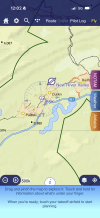
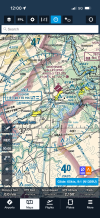
Yeah I’m sure surface data is challenging. River I’m seeing missing near me is the New River. Goes nearby the PSK airport. Claytor Lake is there that it feeds into and feeds out of but river is missing.

I’ll attach photo of the area in the app compared to VFR sectional in ForeFlight to show you the missing river but also for those following the thread as an interesting comparison. The skydemon is definitely much cleaner and less overwhelming and does get rid of some useless data. The biggest thing I feel I’m missing in that image is the mountains don’t contrast as much. In PPL training many still are trained on paper maps so I have it ingrained to look for nice VFR checkpoints to confirm location if not using GPS. So that thin strand of mountain could make a nice checkpoint but it doesn’t stick out nearly as much in Skydemon (it’s visible though if you look for it. The other side though is the VFR sectional has tons of high contrast terrain that you won’t ever make out as any useful VFR checkpoints. So there’s certainly pros and cons to both and it’s a tiny adjustment just in my thinking still so after a couple weeks I may not even mind missing that but I don’t know yet. Just something that got engrained in training. But I don’t fly with paper maps and part of that training was trying to decipher what in the sectional you could even see from the sky and what was useless. You cut out all that useless stuff which is nice. The much cleaner app is nice to look at though.

At the moment I can’t think of any one big must have dataset it’s missing that’s critical for VFR flight, mostly nice to haves. But havent fully used it to plan and fly yet so will see if i feel like anything’s missing when i do that.
 

Attachments

  • IMG_8336.png
    IMG_8336.png
    2 MB · Views: 13
  • IMG_8333.png
    IMG_8333.png
    5.1 MB · Views: 13
The biggest thing I feel I’m missing in that image is the mountains don’t contrast as much...
Noted. I think that possibly overcoming this issue will require us making the special sectional chart style I alluded to earlier in the thread.

However, we do already have a cool function "colour High Terrain" in the Surface features submenu of the mapping menu - when you switch it on SkyDemon asks for a reference altitude (roughly the level you plan to fly at) and colours the map according to relative terrain height. This works in flying mode too, but it uses your GPS altitude as the reference point. Possibly this is not ideal because it needs to be switched on (it is off by default); but for stark views of difficult terrain and particularly for quickly identifying the blind valleys, its pretty great.

I will add the river you mentioned to our list of surface data for follow up; any others that you spot are missing will be great to hear about too.
 
Today my developer mentioned he has published an updated USA chart which now includes:
  • National Security Areas
  • Oceanic FIRs
  • Names for lakes and national parks
  • Frequencies for SUA where provided
I think I would particularly like to have feedback from testers on this last point. The data we have found for this doesn't seem to clearly define the callsign, so we have simply used "Contact" in the normal callsign position... Does this seem reasonable? Or would it be more expected to have the name of the center (for example, "Albuquerque 128.200" instead of "Contact 128.200")?
 
In the last days, the beta version you guys have been giving feedback on has now become public release, so you don't need to go through Testflight to continue playing with it - furthermore, the changes we have made should now be visible on Android and Windows platforms too.

That doesn't mean we are done taking feedback though; we will continue to make improvements. You will all hopefully already note that we integrated all the domestic TAF and METAR, so there are vastly more of those than there were before. Still though, we want to hear from you all about what else could be improved or added; is there anything that you feel is "missing" for light GA in the US? Please do let me know your thoughts, either here or in PM.
 
Some of you might have seen that a new beta version has been pushed to Testflight. No huge changes in this one, but there are some improvements to how routes are depicted, and now you should find the various types of nature/wildlife reserve areas have their data integrated.

Would be great to read some feedback about these elements, but general feedback is still very welcome - here or in PM - since it all drives development. This last week we haven't received much actionable feedback, which is one reason why the new beta doesn't have a lot of new elements in it... If you are testing it please do let me know your thoughts, positive or negative; everything gets considered and folded back into our development processes... though we move quite fast so the sooner the better!
 
Back
Top