

You are using an out of date browser. It may not display this or other websites correctly.
You should upgrade or use an alternative browser.
You should upgrade or use an alternative browser.
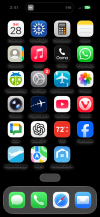
[NA] iPhone wallpaper problem
- Thread starter Let'sgoflying!
- Start date
Let'sgoflying!
Touchdown! Greaser!
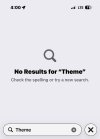
No results when searching settings for “theme”what theme have you set the phone to use?
have you selected dark mode somewhere?
and I think there is something about going darker at night...
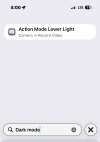
Nor for “dark mode”
“Mode” has about 20 options
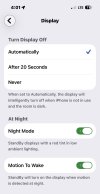
I found “night mode”…. Seems ok
Attachments

- Joined
- Jun 7, 2008
- Messages
- 27,381
- Display Name
- Bob Noel
- Home Airfield
- KBED
Settings->display & brightness appearance
also there night shift
Note that I am running 18.5, so your setting options are probably different. Also, my wallpaper is a shot of the moon with, of course, a black background
also there night shift
Note that I am running 18.5, so your setting options are probably different. Also, my wallpaper is a shot of the moon with, of course, a black background

- Joined
- Mar 2, 2005
- Messages
- 16,628
- Location
- Southeast Tennessee
- Display Name
- This page intentionally left blank
Also check settings in wallpaper

eman1200
Touchdown! Greaser!
Please give absolutely no details about what the problem is.
Let'sgoflying!
Touchdown! Greaser!
Only if you promise to not take the time to read the very concise, plain-English description given in the very first line of the original post lol.Please give absolutely no details about what the problem is.
Plus, I sent a dang photo to assist in showing the problem -ha.
Let'sgoflying!
Touchdown! Greaser!
Also check settings in wallpaper
Thanks for the helpful suggestions, Bob - I’ll keep plugging away at it.
- Joined
- Jun 7, 2008
- Messages
- 27,381
- Display Name
- Bob Noel
- Home Airfield
- KBED
Only if you promise to not take the time to read the very concise, plain-English description given in the very first line of the original post lol.
Plus, I sent a dang photo to assist in showing the problem -ha.
once the typo was fixed :-/

Let'sgoflying!
Touchdown! Greaser!
The only typo I caught was autocorrect’s to vs too
- Joined
- Jun 7, 2008
- Messages
- 27,381
- Display Name
- Bob Noel
- Home Airfield
- KBED
btw - if you want to invest the time, you could try going to the apple store "genius" bar... but I suppose that depends on how far a drive it is and whether your device is still under applecare (or whatever it's called now).
I know, I know, that would be tantamount to surrendering, but it's an option.
I know, I know, that would be tantamount to surrendering, but it's an option.
eman1200
Touchdown! Greaser!
Only if you promise to not take the time to read the very concise, plain-English description given in the very first line of the original post lol.
Plus, I sent a dang photo to assist in showing the problem -ha.
Weird, I still don’t see it on my phone.
Albany Tom
Final Approach
- Joined
- Jul 23, 2021
- Messages
- 5,703
- Display Name
- Albany Tom
It's an OS upgrade. They're not happy until you're confused, and then eventually the device stops working entirely so they can sell you a new one.
Once consumers figure out a way to bill manufacturers for periodically making their life worse we'll be in a better space.
Once consumers figure out a way to bill manufacturers for periodically making their life worse we'll be in a better space.

SCCutler
Touchdown! Greaser!
- Joined
- Feb 27, 2005
- Messages
- 17,409
- Display Name
- Spike Cutler
- Home Airfield
- T82
How do I do that?Turn off transparency mode
Let'sgoflying!
Touchdown! Greaser!
MUCH better BobTo turn off transparency (or reduce the "Liquid Glass" effect) on an iPhone,
go to Settings > Accessibility > Display & Text Size and toggle on Reduce Transparency.
Thanks so much
- Joined
- Jun 7, 2008
- Messages
- 27,381
- Display Name
- Bob Noel
- Home Airfield
- KBED
MUCH better Bob
Thanks so much
happy to help. Note that I'm not running ios 26+, which makes it harder to truly know/understand your complaint.
Let'sgoflying!
Touchdown! Greaser!
It was night, now it’s day!happy to help. Note that I'm not running ios 26+, which makes it harder to truly know/understand your complaint.
(I can read the words, see the time & charge)