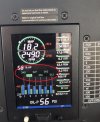
The mystery of the JPI EDM 830 EGT display has been solved!
At the urging of several people on another forum, I set the 830 to landscape mode (even though it is installed in portrait mode). After a reboot, it displayed EGTs, albeit 90 degrees off-kilter. I reset it to portrait mode, and then once again went to JPI's website to look at pictures and try to come up with a solution.
As I stared at a picture of an EDM 830 showing EGTs, a lightbulb (or LED) went off over my head -- the picture was only showing a few rows of linear graphs on the right side of the screen! Now the question became, how do I set the JPI to show only five rows of graphs, instead of the 10 rows that my screen was currently showing?
I drilled down into the 830's set-up menus. (I may not have the exact JPI nomenclature quoted here, but it's close enough to give you an idea of the process, which is self-evident once you get into it.) At the end of the "regular" set-up menu, it asks "end?" If you hit both the step and LF buttons at the same time, it takes you into a sub-menu. After a bunch of button pushes (to which I answered "no"), I was asked by the 830 (paraphrasing here), LINEAR GRAPH 10? When I hit the "change button," it changed to LINEAR GRAPH 5? I hit save, and held my breath. I clicked down to the end of the sub-menu, and it asked me to exit or save. I hit save, and the EDM 830 re-booted. And when finally booted up, sure enough, the EGTs were showing! Before and after pictures below.
Before:
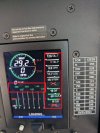
After:
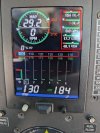
Now the task for me is to determine what data I want showing in the five linear graphs (they're set-able), and where on other instruments (e.g., G5, AV20, IFD 540) I can get the data I'm omitting from the 830.
Hopefully this write-up will help the next person who encounters this issue!