iTouch

Let'sgoflying!

Touchdown! Greaser!
Joined
Feb 23, 2005
Messages
21,872
Location
west Texas
Display Name
Dave Taylor
Home Airfield
KMRF
I just received one; can I erase the OS & software, and install alternative ones?

 
Ok, I am stuck with i-whatever.

I'd be glad to help: send it to me, and you won't be stuck with it anymore.

P.S.--Done watching the DVD, will get it back in the mail to you. Thanks for lending it to me. Apollo missions = amazing.
 
I just received one; can I erase the OS & software, and install alternative ones?

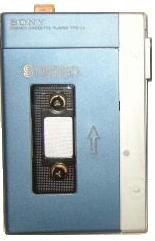
LOL Dave. Have you considered one of these instead???

WalkmanTPS-L2.jpg


With your luck with high tech devices you may want to keep it simple. :D
 
LOL Dave. Have you considered one of these instead???

WalkmanTPS-L2.jpg


With your luck with high tech devices you may want to keep it simple. :D

That has a button; too complicated. Try this:

attachment.php
 

Attachments

  • ScreenShot003.jpg
    ScreenShot003.jpg
    16.9 KB · Views: 86
I am not sure I understand what you think you are stuck with. The OS in the iTouch is why people buy it in the first place. Those that do not want that Apple OS opt to buy a whole different mp3 player.

it was given to me, I would not have chosen it. Not to appear ungrateful of course but its not something I would have bought!
 
There are programs that let you "jailbreak" the iTouch. What OS do you want to install? The OS already on it is a Linux variation. If you get the jailbreak software you'll see the linux file structure and everything.

If you're REALLY interested in doing this, search for "iphone" " jailbreak"
 
lol, you're so funny!

And they let you even NEAR the jet?! :lol:

I am feeling better about my techo-calamity syndrome,....my receptionist reports she was quietly using her laptop in bed on Sat and the dang thing burst into flames!!
 
let me (sigh) try it, and I will let you know. Just the idea that I have to use iTunes to access the device is threatening.
You don't have to use iTunes if you don't want to.

You can use what ever software to manage your music that you want. Make sure your music is in mp3 or aac format.

To move that music to the iTouch configure the iTouch as a mounted drive and just do a drag and drop.

or you can use this
http://www.downloadatoz.com/f/ipod-to-itunes-transfer/do-you-have-to-use-itunes-with-ipods_g.html

But that is something you need to buy whereas iTunes and the aforementioned drag and drop is free.
 
What in God's name was she looking at... in bed?

I did question the witness about that counselor, but without material evidence (the subject computer self-immolated) we are left with circumstantial conclusions.
 
I am feeling better about my techo-calamity syndrome,....my receptionist reports she was quietly using her laptop in bed on Sat and the dang thing burst into flames!!

Do you remember the video of a laptop in a meeting room catching fire? The hotel people then threw water on it and it really burst into flames?

Well that was a co-worker of mine's laptop and it lead to the recall of lots of batteries. When you are one of Dell's top customers you get a lot of pull especially when the failure is seen on CNN.

Batteries can and do over heat. It is possible and plausible that she is telling the truth and did nothing wrong.
 
Dave, for what it's worth, I love my iPod Touch in it's unjailbroken version. The only thing I really wish it had was GPS capabilities. As far as apps to get to make it useful in an aviation context (which, sadly, do cost money), I would recommend ForeFlight Charts, AOPA Airports (free if you're an AOPA member), PilotAIM, PilotFAR, and iE6B. If you really want to be bold, pick up ForeFlight Checklist and ForeFlight mobile (I don't have the last one for budgetary reasons, but will probably get it eventually).
 
How do I transfer bookmarks, addies?

When you plug your iPod Touch into iTunes, you should see it listed under "Devices" on the left. Click on it. This will show you the Summary screen for your device. At the top of this screen are a series of tabs. Click on the Info tab. This will let you select which things you want to Sync, and from where. As a warning, if you have Mail accounts set up to an Exchange server on your iPod, don't sync Mail, Contacts, or Calendars from your computer - that gets done automatically whenever the iPod is in contact with the Exchange Server.
 
How do I transfer bookmarks, addies?

1) Buy a Mac
2) Sign up with Plaxo to sync Phonebook with your current contacts source.
3) Sync Phonebook to the iPhone

Sorry, was that not helpful?


Is there a Phonebook app on Windows the iPhone will sync with? If so, Plaxo will get the contacts into it.

Diregard. There is a Plaxo app:
http://www.tuaw.com/2008/01/23/plaxo-improves-address-book-sync-and-adds-iphone-ui/

Just sign up for Plaxo, install the Plaxo app (App Store), and sync to Plaxo to the iPod.

http://www.plaxo.com
Just sign up for Plaxo, install the Plaxo app (App Store), and sync to Plaxo to the iPod.

http://www.plaxo.com

Make sure you turn on every privacy option on Plaxo.
 
Last edited:
let me (sigh) try it, and I will let you know. Just the idea that I have to use iTunes to access the device is threatening.

You and me both. I like my iTouch (I'd buy a jailboke iPhone if someone could verify that it would support the UMA service through T-Mobile which I need since I use it through the satellite wifi on the boat to keep my US number worldwide) as it has a bunch of apps and I can use it for Skype and also as a Sonos system controller (handy app for me since we have a dozen Sonos zones on the boat), but I'm not that fond of iTunes and the restrictive file management.
 
now I need some to learn some battery sparing tricks; it lasted the morning (not all morning in-use, just periodically)
 
hmm works on a linksys router a v.g.f. bought, and helped me install here in the guest room...will take that to work tomorrow and try it.
 
I also note, to the itouch's credit that it is not stimulating all sorts of malevelant behavior on my laptop when I mate them for charging purposes.
 
I also note, to the itouch's credit that it is not stimulating all sorts of malevelant behavior on my laptop when I mate them for charging purposes.

See? You were used to teh eval that is Microsoft.

Now go get an iMac.
 
well the darned thing is connecting at work today with no changes.
I hate intermittent problems!
 

Attachments

  • steve-jobs-of-borg.jpg
    steve-jobs-of-borg.jpg
    24.3 KB · Views: 40
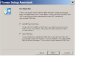
I am installing itunes.
See desktop snapshot.
Seems to be saying that it WILL convert all my songs to AAC (ie RIAA protected) songs. T or F?
If false, thanks I will continue.
If true,:yikes::nono: this is unfair - I bought these songs on CD years ago and have the right to move them about on my devices unimpeded. How can I get those songs on my device without having them protected?
 

Attachments

  • Itunes.JPG
    Itunes.JPG
    55.7 KB · Views: 7
I am installing itunes.
See desktop snapshot.
Seems to be saying that it WILL convert all my songs to AAC (ie RIAA protected) songs. T or F?
If false, thanks I will continue.
If true,:yikes::nono: this is unfair - I bought these songs on CD years ago and have the right to move them about on my devices unimpeded. How can I get those songs on my device without having them protected?

False, it "can" do it, but I keep mine in MP3. You do need to have one computer to dedicate your music to, because an iPod only works with one computer at a time. When you want to synch it with another, it'll have to erase your iPod, so make sure you keep it all backed up somewhere to reload on another computer incase the one you synch to goes TU because you can't (or I haven't found a way) to load the music to the computer from the iPod.
 
I am installing itunes.
See desktop snapshot.
Seems to be saying that it WILL convert all my songs to AAC (ie RIAA protected) songs. T or F?
If false, thanks I will continue.
If true,:yikes::nono: this is unfair - I bought these songs on CD years ago and have the right to move them about on my devices unimpeded. How can I get those songs on my device without having them protected?

It won't DRM anything.

AAC format is not the DRM. It's only when they had DRM it was in a form of the AAC format.

AAC is actually a better quality encoding scheme than MP3.

Apple doesn't put DRM on anything. You'd only have DRM if you bought a song from Apple more than a year ago.

You can RIP your CDs to Apple lossless and play them anywhere that understands the format.

The advantage in MP3 is mainly that all kinds and brands of devices can play it.
 
Last edited:
It won't DRM anything.

ah. I was following your comments here and did not realize it was an historical issue. Tks. I will, with trepidation and your reassurance, continue the itunes install!

I like how they refer to them as unprotected, as if it is a benefit to us.
 
Back
Top