Increased phishing emails

AggieMike88

Touchdown! Greaser!
Joined
Jan 13, 2010
Messages
20,803
Location
Denton, TX
Display Name
The original "I don't know it all" of aviation.
Home Airfield
KDTO (Denton Enterprise)
This summer, I've seen an increase in the "creative" phishing emails where the mail appears to be similar to a potential legit email, but when you point at the link's provided, they all are going to somewhere other than the spoofed company.

Example:

attachment.php


I do have service with Verizon Wireless, but no way am I ever doing so much that I would be paying $1439.05! But I know this outrageous amount is to get the user who isn't paying attention to what's happening to click the link without first checking where they are about to be rickrolled to.

attachment.php


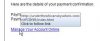
Each link on the email points to this URL.


So, just keep using your smarts and don't click on links in the emails you weren't expecting. Or at least check the URL of the link before clicking to ensure it's legit.
 

Attachments

  • ph1.jpg
    ph1.jpg
    57.7 KB · Views: 178
  • ph2.jpg
    ph2.jpg
    7 KB · Views: 179
I'm fortunate in that my e-mail provider screens all of them. I do occasionally log onto my "web access" and check the spam file. I'm always amazed at what's there. If I didn't check it, however, I'd never know.
 
My spam folder use to get 10-15 spams a day, now it is 50 - 75. Might have to shut it down and get another one. :mad:
 
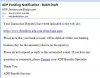
I got a good one yesterday from ADP, they are not only a payroll company, but they handle a good bit of automotive related computer services. Basically, our "digital" certificates have expired and we need to download new ones and delete the old ones. The link didn't go to ADP. :yikes::yikes: of course I didn't click on it, but it looked real legit.
 
I had one the other day that looked like it came from my employer, claiming I have received a $1000 Visa gift card. All I had to do was click on a link to claim my card. After a little quick research, that website had been created merely 2 hours before I received the email.

I've also seen a huge increase in the amount of spam emails I get. Thankfully my junk filter works fairly decently, so I don't have to fish through them all to get the important ones.
 
One of my all time favorite secondary plot lines of a show.


Then later on in the show.

 
I've received one from "FedEx" about a shipment that I never placed. And yesterday I got an email from the IRS stating that my bank transfer was rejected for my federal tax return. Too bad I got a refund from the Feds back in February.

Email like this will really get some people. They look 100% legit.
 
After having my in box loaded with twenty or thirty SPAM messages every day when I turned on my computer, I decided to turn it into a daily project of using my "block sender" option.

At first I was doing it the incredibly slow way. After I clicked on block sender, I would get a pop up asking me if I wanted it to automatically remove all messages from that sender. If I clicked yes, it was a long wait while it scanned all my messages for that sender. If I click no, I could just delete the message and go on to the next one.

At first it was pretty labor intensive because I had so many. Now, after about six months of doing it every day, I only get one or two SPAM messages a week. It works like a charm.

The SPAM senders will make some small change so that it looks like your block sender option is ineffective at blocking them, or just flat out does not work at all, so that you will give up trying to block from them. After a few months, I guess they run out of changes that they can make, because their SPAM does eventually stop.

-John
 
Sorry to hear you all are having trouble. I have a great opportunity to help with a bank account left by a mining engineer in Nigeria!!!! I can get a big chunk of the money by just helping a guy move it our of the country...I could make millions!!!!! Can't wait!!! :D
 
OK, I have a question for you computer savvy types. I have made a few mistakes and ended up permanently blocking a few friends because I did not recognize the e-mail was from them.

How in the heck do you unblock someone?

-John
 
OK, I have a question for you computer savvy types. I have made a few mistakes and ended up permanently blocking a few friends because I did not recognize the e-mail was from them.

How in the heck do you unblock someone?

-John

What software are you using to read your e-mail?
 
One immediate thing that stands out to me --- OUTLOOK is suppressing pictures/banners?
Yahoo does that to me, but Outlook has NEVER done that on my incoming.
If I saw that kind of a header, it would be immediately deleted without even reading it --- just like the phone calls I get from "UNAVAILABLE" or "OUT OF AREA" or "TOLL FREE" and most calls from area 402 (AKA Rachel saying, "Your credit card isn't in trouble, but....")
 
Sorry to hear you all are having trouble. I have a great opportunity to help with a bank account left by a mining engineer in Nigeria!!!! I can get a big chunk of the money by just helping a guy move it our of the country...I could make millions!!!!! Can't wait!!! :D
LOL
There was a Nigerian bizjet sitting on the ramp across from The Flying Machine at KLZU for a couple months.... I wondered when they were going to put it in my account, but it's gone, so someone else must have gotten it. :confused:
 
I like what a friend of mine once said...

"Who are all these people??? And why do they think I need that much Viagra??"
 
I'm using Outlook Express.

-John

I'm sorry to hear that. ;)

To remove a sender or domain from the list:
  1. On the Tools menu, point to Message Rules, and then click Block Senders List.
  2. Click the name or domain that you want to remove on the Blocked Senders tab, and then click Remove.
 
A few weeks ago my junk e-mail box was being inundated with e-mails hawking short-term payday loans. I was getting twenty of them a day or more -- all very similar in format, but differing in names and specific language, and of course all from different e-mail addresses. The links in the e-mails all directed to suspicious-sounding domains, and the e-mails were full of hash-buster text.

They would all include a mailing address to which one could purportedly write to "unsubscribe" -- all random mailing addresses around the country, usually residential. I was amused to look up a couple of the addresses on Google Earth -- real addresses, but they looked like one-room shanties in some backwater rural area.

Then about a week ago the e-mails stopped as suddenly as they started. I kinda miss them ...

... not. :no:
 
I'm sorry to hear that. ;)


To remove a sender or domain from the list:
  1. On the Tools menu, point to Message Rules, and then click Block Senders List.
  2. Click the name or domain that you want to remove on the Blocked Senders tab, and then click Remove.

Thanks, I'll give it a shot. I really appreciate the help.

-John
 
For anyone using Mac, Spam Sieve is great and if configured correctly, filters the spam before it gets to your phone as well.
 
Someday we'll have cryptographically authenticated e-mail. The technology has been available and free since 1991.
 
So my bank [and paypal and my stock breaker] tell me that they will never ask me for my password or log on to 'protect my security,' then they go off and send you emails asking you to log in and get this record or that coupon or that document -

Are they going to ask me for my log in info or not? Really here. Sending me an email and telling me to go log in is the same type of email a phisher sends - so I call them up - get to a supervisor - and tell them that they are asking me to log in after telling me they would never ask me for my log in info -

And the excuse is 'we are not asking you to log in - its up to you to log in.' Yeah- ok. They simply cannot see that their marketing efforts create spamming and phishing opportunities - and their customers are always wrong about this because it is based on some fine bright line that only they can see -

If a company would look at it as their grandmother or grandfather getting the email and then ask: "Would grandpa click on this?" And if the answer is yes - then - if I had hijacked that email and sent it with a .ru address would Grandpa notice the re-direction? No of course not.
 
These companies have no clue how to deal with modern technology. The stories from friends who've worked in bank, credit union, and investment house's IT departments are toe-curling.

Those companies require third parties to meet standards like PCI (1.0 and 2.0, because you know... 1.0 was so good they had to rev it), but don't have any laws or requirements to follow those same procedures or be audited themselves, in-house.

That's right... Your credit card company makes a big deal out of PCI 2.0 for vendors, but none of them are themselves PCI-compliant. Cool twist, isn't it?

I'm going through all sorts of fun right now doing a re-finance deal. You should see the stuff they had me e-mail. Considering that it was all unencrypted, unauthenticated... I think now that I know their process I could probably sign my neighbor up for a loan or two.

The most interesting part is their love of fax machines.

I had to find one that actually had a real phone line on it just to fax them a pile of paper about half an inch thick. I would love to see what kind of security was around that pile of paper sitting on a fax machine in an office somewhere. Probably zero.

I'll know who to call first if my identity is stolen, I guess. ;)

My favorite so far was the letter required because "two more addresses came up in our background check on dates in 2008 and 2010".

Yes, of course they did. Those are our previous two homes. One we left in 2001, the other sometime around 1997. Why they'd show up in your stupid database seven years after we sold them, is your problem, not mine. Yes I will sign a letter stating we no longer live there. Hell, I couldn't even remember the first one. Kinda neat to see the old address again.

Then a call that our insurer hadn't sent over requested info in four days. A call to them and they say they faxed it twice. Other end didn't receive. Great. Where did those faxes really go? ;) Back to unencrypted unauthenticated e-mail we go, and I have them the document in literally 12 minutes from the first phone call to hitting Send on the forwarded copy.

I'm sure ALL of this stuff is on computers where it shouldn't be now. Someone's laptop somewhere at one company or the other. And will be on lots more before I sign the hard copies, which will get scanned onto a few more.
 
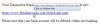
And it continues. This is the 3rd one related to ADP I got today. The first two were the exact same wording, but the URL's for the links were different.

attachment.php


attachment.php
 

Attachments

  • ph3.jpg
    ph3.jpg
    27 KB · Views: 57
  • ph4.jpg
    ph4.jpg
    9.1 KB · Views: 55
Started getting messages from "AT&T" today saying that I racked up $600 worth of data charges on my iPad. Hover over the Login button and it doesn't go to AT&T.com. Looks like a good spoof - logos and tables just like the real bills. Looks completly legit.
 
Somewhat related I've been getting SPAM texts on my iPhone. First gave some goofy fact and then said "text stop to end messages." I ignored it since I didn't request it and didn't want to verify an active cell # (correct procedure for email). Well one month later get another similar text and then $9.99 charge on bill. AT&T rep said I signed up for service and that they sent me info for the fee. They did refund my money but said I should have relies with stop. I'll do so in the future but just wrong.
 
I've been getting quite a few spam mails in all Chinese.
 
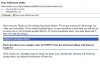
Here's a new twist.

Check out the number I'm supposed to call "if I have questions about my order".

attachment.php


And when I viewed the email, my AV software caught/stopped a trojan, "Trojan:JS /IFrame.V"

From the information site: "Trojan:JS/Iframe.V is a malicious JavaScript file that is embedded, via an IFrame, into malicious or compromised webpages, usually via SQL injection or through Blackhat search engine optimization (SEO) poisoning. The purpose of the file is to redirect your browser to other sites that may download malware onto your computer."
 

Attachments

  • ph1.jpg
    ph1.jpg
    44.2 KB · Views: 10
Back
Top