ForeFlight sectional tearing

AggieMike88

Touchdown! Greaser!
Joined
Jan 13, 2010
Messages
20,803
Location
Denton, TX
Display Name
The original "I don't know it all" of aviation.
Home Airfield
KDTO (Denton Enterprise)
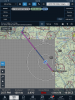
Anyone ever see this occur before?
 

Attachments

  • IMG_0118.PNG
    IMG_0118.PNG
    2 MB · Views: 247
10 minutes later, when I was vectored to SLUGG to cut the corner before the VOR, it came back.

This is on an iPad Mini Retina, 128GB, latest iOS, FF, and Chart cycle.
 
10 minutes later, when I was vectored to SLUGG to cut the corner before the VOR, it came back.

This is on an iPad Mini Retina, 128GB, latest iOS, FF, and Chart cycle.

Well, looks like a random accessing issue? Hmmm. Ususally those types of things work themselves out in a refresh recycle.
 
email with the image has been sent to the support team.
 
Anyone ever see this occur before?
I see it too frequently on my old Ipad 2. I attribute it to a timing issue due to the higher overhead of the newer IOS and bloatware. It is one of the reasons I want to get a new Ipad and why I was disappointed when the last Apple announcement didnt' address that. My wife has an Ipad mini that hasn't had that problem, but sitting in the co-pilot seat, I have room for the larger Ipad, and I like the larger display. But I think the Ipad Pro is just too big.

What generation Ipad were you using?
 
10 minutes later, when I was vectored to SLUGG to cut the corner before the VOR, it came back.

This is on an iPad Mini Retina, 128GB, latest iOS, FF, and Chart cycle.

I've seen that when the ipad processor got overloaded. Usually I just panned the map and it went away. I have an iPad mini retina as well and between lots of apps running, a bunch of FF enhancements, and a bunch of IOS updates I suspect the hardware might be starting to get taxed.
 
Last edited:
Lotsa apps running might be the culprit. I forgot to shut down everything but what I really needed for the flight. And that likely explained why my battery life wasn't what it usually is for an out and back...

Might need to update my iPad preflight checklist to cover "shut it down. Shut it all down"

(Points if you guess the pop culture reference I'm thinking if without using Google-fu)
 
Zoom out, then zoom back in and it goes away, for me.

I attribute it to the processor getting bogged down.
 
How much crappola is open? Try shutting down and repowering before you go flying and only open the Foreflight app, and connect only your Foreflight "devices" (external GPS/ADSB receiver).
 
I get it from time to time but only when I first load the page. It takes about 10 seconds to come up fully. It started to happen on my IPad 2 when IOS 9 was loaded to it.
 
The NSA has temporarily CLOSED that section of the United States of America.
STAY OUT!
 
If it makes you feel any better, that has also happened to me, but on Avare and FltPlan-Go.
You just get on and sqooch the maps around abit and then re-center and the missing pieces pop back into place.
Think it's a reload problem -- but it's not specific to FF
 
I've seen it do this when it's waiting for a sectional to load. My older iPad does this a lot. Usually it just takes a few seconds to load that sectional on my iPad Air 2 but on the older iPads it can take a little longer.

I don't think I've seen it persist except in the case where I don't have network access and the map is not downloaded.
 
It happens on my Ipad 2 mini, and I have nothing else other than FF open. I think it's 64gb.

I think it's the cell signal issue, not a CPU issue.
 
Have only had it happen twice,I also now shut down all apps,except foreflight and the electronic log book,when flying.
 
What is more annoying on FF is when you enlarge the sectional around some class D airports and part of the display becomes really sharp and clear zoomed in and part stays zoomed out. Somebody told me that when you zoom in, the sectional turns into a TAC in some areas.

Look at KHVN (New Haven). Have it on your FF sectional and start to enlarge. At some point, the blue airport circle will become distorted. Also happens around KFOK (Gabreski)
 
Somebody told me that when you zoom in, the sectional turns into a TAC in some areas.

Look at KHVN (New Haven). Have it on your FF sectional and start to enlarge. At some point, the blue airport circle will become distorted. Also happens around KFOK (Gabreski)

Correct statement. When you zoom into a TAC area it displays the TAC once below a certain zoom level. This can look goofy and discontinuous at the edges of TACs when zoomed.
 
What is more annoying on FF is when you enlarge the sectional around some class D airports and part of the display becomes really sharp and clear zoomed in and part stays zoomed out. Somebody told me that when you zoom in, the sectional turns into a TAC in some areas.

Look at KHVN (New Haven). Have it on your FF sectional and start to enlarge. At some point, the blue airport circle will become distorted. Also happens around KFOK (Gabreski)

The default assumption is that you want the higher-detail TAC wherever it's available. That particular airport is only half-displayed on the TAC.

If you want to be able to switch between the sectional and the TAC click on Settings (gear icon up top) -> Map Touch Action -> Bring chart to front.
 
mmmm.... I was thinking of a movie with Anthony Daniels and a oversized compactor.
 
The default assumption is that you want the higher-detail TAC wherever it's available. That particular airport is only half-displayed on the TAC.

If you want to be able to switch between the sectional and the TAC click on Settings (gear icon up top) -> Map Touch Action -> Bring chart to front.

In another thread we discussed the "bring chart to front" option in map settings. Then you can tap the map and it will bring the underlying section to the top so you can get a better look at those items that are chopped off at the edge of TACs. Tap again to toggle it back.
 
Back
Top
