FAA Aviation Weather Cross Section Tool

MarcP

Filing Flight Plan
Joined
Jan 26, 2020
Messages
24
Display Name
Marc P
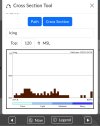
Hello, playing around today with the FAA Aviation weather site, and they have this nifty cross section tool (you can select it from the right side) to look at conditions across your route-of-flight (icing, temp, turbulence, wind). When I plot KCCR -> KSNA, each of the cross section pictures shows the brown shapes at the bottom (in the same pattern), that don't correspond to the legend. The help doesn't explain what it represents. I assumed it was ground elevation, but that doesn't match this route.

It is very foggy along this route now, maybe showing base/top info?

Thanks!
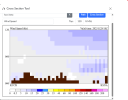
Cross Section Tool.png
 
Looks to me that brown DOES represent ground elevation (cumulogranite).

Use KSCK as an intermediate waypoint and see if the brown in the first half of the route disappears.
 
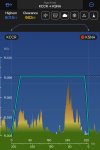
No, there are quite high mountains before you get into the LA Basin. Here is the profile from a flight planner showing mountains up to 7000 ft. The brown bars only go up a few thousand.Profile.png
 
brown shapes at the bottom … assumed it was ground elevation
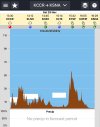
Agreed. For aviationweather.gov, Cross Section displays terrain in brown.

C4C1C791-64B5-4BDC-A54E-3FD82B0C2F35.jpeg

doesn't match this route

Agreed. AWC terrain doesn’t appear similar to ‘Profile’ views in other applications, such as Garmin Pilot or Weathspork.

640655C7-0851-40C0-838B-50B32AFF74DE.jpeg932A34DE-7579-4FB5-B045-AD4F52489D5B.jpeg

Maybe a question for AWC, why?

401B9613-839D-489D-937D-1E57D9F8E4A8.jpeg
 
Last edited:
@MarcP
Thanks Marc,
If there’s a response (from AWC), it will be interesting to learn why terrain in AWC profile does not correspond to terrain displayed in other sources (which appear consistent in Garmin Pilot, EZWxBrief, WeatherSpork, iflightplanner.aopa, etc.)

As illustrated above (KCCR-KSNA), AWC remains the odd-man-out, and can’t be explained by varying ‘width of route’ parameters.

Thanks.
 
Last edited:
Back
Top