Chart Supplement Airport Diagrams?

JeffinNV

Pre-Flight
Joined
Aug 11, 2025
Messages
48
Location
Carson Valley
Display Name
Jeff
Home Airfield
KCXP
I am trying to puzzle out how to quickly find an airport diagram in the back of the chart supplement.
I can not figure out how the diagrams are organized. They don't seem to be alphabetical by airport code, town/city/county or by state or local areas within a state.

Unless the information is somewhere on the airport information page and I've overlooked it, which is possible.
 
  1. Go to the Airport/Facility Index (front or back of the CS)
  2. Look up the airport by:
    • FAA ID or
    • Airport name
  3. Note the page number
 
I thought it was by state and then by airport name
The airport information pages are (logically) organized in this manner.
The diagrams in the back, for some reason, are not.

I looked for the facility index and could not find one anywhere in my book for the diagrams in the back.
 
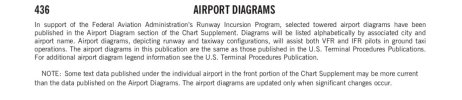
Thank you Matthew, your info states "select towered airports".
I've been looking for a couple of local un-towered airports.

KCXP is also un-towered however it does have a diagram in the book.
I assumed all airports in the region would have a diagram in the book.

I knew it had to be something simple I was overlooking :)
 
Thank you Matthew, your info states "select towered airports".
I've been looking for a couple of local un-towered airports.

KCXP is also un-towered however it does have a diagram in the book.
I assumed all airports in the region would have a diagram in the book.

I knew it had to be something simple I was overlooking :)
There are typically small, minimal detail, diagrams with most airports included with the airport info. The diagrams in the back are more specifically for towered airports.

Edit: I thought those were all towered, but CXP is not.
 
Last edited:
Back
Top