Calendars: Solution to the madness?

flyingcheesehead

Taxi to Parking
Joined
Feb 23, 2005
Messages
28,184
Location
UQACY, WI
Display Name
iMooniac
Home Airfield
KUES/KMKE
I'm trying to figure out a way to get all my calendars to work well together.

Right now, I have two MS Exchange calendars (one at my company, one at a client) and several iCloud calendars. I'd like to have at least one additional shared calendar between myself and my fiancée, preferably something that works well on iOS as she doesn't like using electronic calendars anyway and needs to be able to ease into it. (Built-in calendars should be fine, I just don't have any experience sharing them.)

Is there a way to get all of the above to play well together? I'd like for the Exchange calendar at the client to show just plain "busy" if there's something on my other calendars that's not on their site. I'd like my work Exchange calendar to say "Busy" for my personal stuff, but it'd be OK if the events from the Exchange calendar at the client were fully listed. And, I'd like for myself and my fiancée to be able to see everything so that we can schedule things without having to wait and check with the other person.

Help! (And thanks in advance.)
 
Can you just give her a mailbox on your exchange server? Problem solved and it works perfect with IOS.
 
I'm trying to figure out a way to get all my calendars to work well together.

Right now, I have two MS Exchange calendars (one at my company, one at a client) and several iCloud calendars. I'd like to have at least one additional shared calendar between myself and my fiancée, preferably something that works well on iOS as she doesn't like using electronic calendars anyway and needs to be able to ease into it. (Built-in calendars should be fine, I just don't have any experience sharing them.)

Is there a way to get all of the above to play well together? I'd like for the Exchange calendar at the client to show just plain "busy" if there's something on my other calendars that's not on their site. I'd like my work Exchange calendar to say "Busy" for my personal stuff, but it'd be OK if the events from the Exchange calendar at the client were fully listed. And, I'd like for myself and my fiancée to be able to see everything so that we can schedule things without having to wait and check with the other person.

Help! (And thanks in advance.)

Never found any good way to get them to play nicely together. Exchange for work, iCloud (formerly .Mac) for home, Karen has her own home calendar also on iCloud, and we share those back and forth. If something work-related is going to fall outside of business hours, I just put another entry on the home calendar or copy from the Exchange calendar (although usually I don't want all that detail copied... so I just make a new one).

Has worked okay for us for years... only time it gets hosed is if I don't remember to mark a particular evening event on a weeknight as having a work-related thing. On my devices, I can see it all... on Karen's device she can see her personal calendar and mine, so the onus is on me to manually "sync" anything that'll mess up her evening(s) from my job onto my personal calendar so she knows what's up.

If you want a REAL mess, start sharing the auto-generated OSX/iOS Birthday calendars! ROFL... lots of dupes there, if you both have contacts with the same people in them... heh...

I did play with the Windows-based iCloud settings that would sync Exchange directly from the work laptop into iCloud. That made a mess, and often broke recurring appointments. Hell, accepting a change to a recurring appointment with any iOS device from Exchange runs a significant risk of screwing it up if there were any one-off meetings that weren't part of the recurrence... it's about a 50/50 shot, and I haven't nailed down which specific course of events will totally hose that and destroy some of the meeting requests, but it ain't right... Apple hasn't gotten that quite right yet. Using Outlook for Mac helps, but it also can trash stuff. I tend to never hit "Accept" on any of the Apple devices for new things in the Exchange calendar... I save those for when I'm at the Winderz machine. Makes less of a mess.
 
I have no idea on the proper verbage, but this is what my wife and I do,..

My work Outlook calendar is sync'd to my Gmail calendar by using their sync app downloaded to my work PC. This shows all my events in both locations. If I wanted, I could sync only work to Gmail, or vice versa.

On her Ipad, I added my Gmail address but set it as a Calendar Only, so she isn't loading my email on her Ipad. On my Google Nexus 7 tablet, I also see my Gmail calendar.

My wife primarily likes to use the paper calendar on the basement door to have all the kids stuff for school, dr appts, etc. Once in a while, I take that off the door and enter some of the stuff I need to know about into my tablet. Once she saw it popping up reminders on her Ipad, she liked it and started putting some items in herself. Pretty easy transition.

Her items don't make a conflict with my work events or scheduling due to the way I have the Gmail Sync settings on my work PC.
 
Paper calendar on the fridge.

Everyone makes things so difficult.
 
If you mark an Exchange appointment private, others who have the right to see it will only see busy.
 
Doesn't do me much good when I need to schedule a meeting and I'm at work...

Work meeting = work time = work calendar. I'm pretty sure your finacee doesn't need to know you have a 2:45 with Joe from HR. And if she does, ask her for your balls back.

Techheads try to over complicate things.
 
Work meeting = work time = work calendar. I'm pretty sure your finacee doesn't need to know you have a 2:45 with Joe from HR. And if she does, ask her for your balls back.

Techheads try to over complicate things.

Meh... As a consultant, my work time is highly flexible. It's not 9-to-5. I can have days where I do nothing, I can have weeks where I bill 60 hours on a single client/project, I can have days where I work on 5 different projects and still finish early, or I can work 10 hours Monday-Thursday and take Friday off.

So, I'd like to be able to mix all my schedules into one comprehensive calendar solution.
 
I have everything sync'd through Google calendar.

We converted over from paper to online at the house over a year ago and it's simplified everything immensely.

I've merged the house, my consulting business, another work exchange, plus all the scouting and sports calendars together. It makes planning a breeze now.
 
Meh... As a consultant, my work time is highly flexible. It's not 9-to-5. I can have days where I do nothing, I can have weeks where I bill 60 hours on a single client/project, I can have days where I work on 5 different projects and still finish early, or I can work 10 hours Monday-Thursday and take Friday off.

So, I'd like to be able to mix all my schedules into one comprehensive calendar solution.

Im trying to de-Google but google calendars allows you to add any google contact to an event. In fact i just scheduled a 14:00 ET event with Nick from my phone to make fun of you and your Apple calendars. :D
 
Last edited:
Have to ask...doesn't iPhone do this? Because Android does.

I am in the same boat - I like my wife to know when I am free to keep her from bothering me when I am busy.
 
Have to ask...doesn't iPhone do this? Because Android does.

I am in the same boat - I like my wife to know when I am free to keep her from bothering me when I am busy.

Nick,

I can see all of my calendars on my iPhone, but what I'm after is something where Kelsey can see when I have a meeting at work, for example, or a flying club board meeting without having to be logged into my exchange accounts.

I guess I'll look into Google calendars. Pretty soon, Google will send me emails telling me I need to eat more fiber. :rolleyes::rofl:
 
Have to ask...doesn't iPhone do this? Because Android does.

I am in the same boat - I like my wife to know when I am free to keep her from bothering me when I am busy.

Unfortunately, I've found that the only way to do that is to not tell your wife where you work.

-Rich
 
Nick,

I can see all of my calendars on my iPhone, but what I'm after is something where Kelsey can see when I have a meeting at work, for example, or a flying club board meeting without having to be logged into my exchange accounts.

I guess I'll look into Google calendars. Pretty soon, Google will send me emails telling me I need to eat more fiber. :rolleyes::rofl:

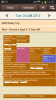
You mean like this (pink is my wife's calendar, blue is my personal calendar, brown is my work calendar):
attachment.php
 

Attachments

  • Screenshot_2013-10-29-14-36-33.png
    Screenshot_2013-10-29-14-36-33.png
    427.7 KB · Views: 75
You mean like this (pink is my wife's calendar, blue is my personal calendar, brown is my work calendar):

Yeah, something like that. I think it's actually going to be hardest to get my schedule onto her phone - She would only have one electronic calendar, but I have several that all need to be viewable by her, at least in the form of "something's happening at this time."
 
You mean like this (pink is my wife's calendar, blue is my personal calendar, brown is my work calendar):
attachment.php

No this isn't what Kent wants. You have all those calendars setup on your phone so you can see them all. My IPhone does that too.

Kent wants it so that if something were to get scheduled on his work calendar his woman would know about it without having access to his work calendar. Basically he needs events that get created on one calendar to duplicate on all the other calendars.
 
Im trying to de-Google but google calendars allows you to add any google contact to an event. In fact i just scheduled a 14:00 ET event with Nick from my phone to make fun of you and your Apple calendars. :D

An iPhone can do that just fine. You fail to understand what Kent is trying to do.
 
Yeah, something like that. I think it's actually going to be hardest to get my schedule onto her phone - She would only have one electronic calendar, but I have several that all need to be viewable by her, at least in the form of "something's happening at this time."
If you replicate your events to a google calendar, you can share the calendar with her. It SHOULD propagate down to the device as an exchange calendar, but I think my Android device does this a bit better than my IOS device.
 
No this isn't what Kent wants. You have all those calendars setup on your phone so you can see them all. My IPhone does that too.

Kent wants it so that if something were to get scheduled on his work calendar his woman would know about it without having access to his work calendar. Basically he needs events that get created on one calendar to duplicate on all the other calendars.

I see. My wife can see both hers and my google calendar, but my outlook calendar at work is not viewable outside work. I have, however, copied free/busy time to my google calendar at times to allow her to see when she is ok to bother me. She doesn't need to see the details, nor would most companies be ok with sharing that level of detail.

That said - if you use Google Apps at work, you could theoretically share that detail across.
 
Im trying to de-Google but google calendars allows you to add any google contact to an event. In fact i just scheduled a 14:00 ET event with Nick from my phone to make fun of you and your Apple calendars. :D

Uhh, you can add anyone with an email address to an Apple calendar. Not sure why you think you can't.
 
I set all my dates on my company email and email all of my other personal accounts. To get it to work, I have to sign on to google and reply.
.
I can also add the email entry to each of the calendars I have. Google and two phones all get updated.
.
Five calendars all pinging me that I have a meeting. Ooops, sorry I missed the meeting. I was busy doing something else.
 
Back
Top