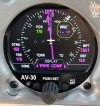
AV-30 wind component display.

pburger

Pre-takeoff checklist
Joined
May 26, 2007
Messages
489
Location
Houston, TX
Display Name
Paul B.
Home Airfield
TS07
I noticed something the other day on my AV-30 display that I found a bit inconsistent:

There are two options for displaying the wind: one is the “wind vector”, which shows an arrow and a numerical speed. The arrow points in the direction the wind is blowing.

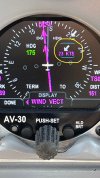
The second wind display option is the “wind component” view, which shows both the headwind/tailwind and the crosswind components. The speed of the HW/TW component is shown on the left with a triangle pointing up or down. This triangle points in the direction the wind is blowing- up for tailwind, down for headwind. The speed of the crosswind component is shown on the right with a triangle pointing left or right. This triangle points in the direction the wind is coming from.

I realize that winds are almost always represented by the direction they are coming from (270/6 would be winds FROM the west), so it might make sense that an arrow would point toward where the wind is coming from. I get that, but whatever the arrow represents, I would think it would/should be consistent. On the AV-30 there are three graphical presentations of wind (the vector and the two components), and two out of those three point in the direction the wind is blowing TO, and one points in the direction the wind is coming FROM. I find this very counterintuitive.

Any thoughts?
 

Attachments

  • IMG_6940.jpeg
    IMG_6940.jpeg
    692.4 KB · Views: 25
  • IMG_6939.jpeg
    IMG_6939.jpeg
    690.8 KB · Views: 24
Yeah, that's goofy. The arrows should point in the direction the wind is blowing, not point to where it is coming from. My GI 275 does it correctly, IMO.
 
And to clarify, this isn’t a bug, it is how they planned it. I checked the manual, and the presentation is clearly described. Only the crosswind component points toward the source of the wind. All the others point the way the wind is blowing.
 
Agreed, seems idiotic to present headwind and crosswind component arrows using opposite convention. Inconsistencies like that are likely to confuse pilots at moments of stress, like setting up for an off airport emergency landing.

Note that the wind component vertical component indicates tail wind (up) or head wind (down) while the horizontal component indicates the side of the aircraft impacted by the wind. In other words, the horizontal arrow points right when the wind is coming from the right and points left when coming from the left.​
​
As an aside, I can't get wind on my DG/HSI display. OAT input is required, and right now that is connected to the top unit, which is locked in AHI view. I think it makes more sense to have wind on the HSI. Am planning to install an AV-HSI soon, which allows sharing of inputs between both units.
 
Last edited:
Some history there: the AV-30 originally had the the wind component going the other way - the way that's more intuitive.

During testing people complained that the AV-30 was opposite of what their GI-275 indicated. They thought it was confusing to move between planes with different instruments and have things behave opposite. Clearly big Garmin was right and little uAvionix had it wrong. The AV-30 team opted for consistency.

Turns out the GI-275 had a bug all along. Garmin reversed the wind arrow in their last software release (3.42). I suspect the AV-30 will make the same change soon enough.
 
Some history there: the AV-30 originally had the the wind component going the other way - the way that's more intuitive.

During testing people complained that the AV-30 was opposite of what their GI-275 indicated. They thought it was confusing to move between planes with different instruments and have things behave opposite. Clearly big Garmin was right and little uAvionix had it wrong. The AV-30 team opted for consistency.

Turns out the GI-275 had a bug all along. Garmin reversed the wind arrow in their last software release (3.42). I suspect the AV-30 will make the same change soon enough.
What a great post! I was wondering if there was any standard for this type of depiction, and then I thought, "I wonder what Garmin does?". I hadn't had a chance to look that up yet, but this bit of history explains it.


- There was a similar situation where the AV-30 had something right, they changed it, and now they've changed it back. When I installed my AV-30's I noticed that the heading bug was not available when in GPSS mode. Apparently it used to be there (for reference only when in GPSS mode), but they decided to declutter things on one of the firmware updates and took it away. The problem is when switching modes: If ATC gives you a vector, you can't dial it in and then switch modes. You have to switch modes, then the heading bug pops up, and then you have to quickly dial in the heading. Thankfully they put the heading bug back, which makes transitioning to heading bug mode much easier.
 
What a great post! I was wondering if there was any standard for this type of depiction, and then I thought, "I wonder what Garmin does?". I hadn't had a chance to look that up yet, but this bit of history explains it.


- There was a similar situation where the AV-30 had something right, they changed it, and now they've changed it back. When I installed my AV-30's I noticed that the heading bug was not available when in GPSS mode. Apparently it used to be there (for reference only when in GPSS mode), but they decided to declutter things on one of the firmware updates and took it away. The problem is when switching modes: If ATC gives you a vector, you can't dial it in and then switch modes. You have to switch modes, then the heading bug pops up, and then you have to quickly dial in the heading. Thankfully they put the heading bug back, which makes transitioning to heading bug mode much easier.

I gave them an earful at Oshkosh about lack of heading bug in the nav and traffic views. They fixed it. You're welcome. :cool:
 
Based on compjtc's post I did some research, and found a few forum posts about this inconsistent display on the Garmin GI-275 back in 2024, and found where it was corrected by Garmin in July of 2025 with firmware update 3.42. I just submitted a ticket to uAvionix about this. We'll see what they say.
 
Back
Top